
Allay is the project I finished my Higher Vocational Degree in Web Application Development (Grado Superior en Desarrollo de Aplicaciones Web) with: the Proyecto Intermodular, the Spanish vocational equivalent of a final-year project. We built it as a team of two, Helen Cano and me, and the starting idea is easy to explain: take a Minecraft server beyond the game.
If you’ve played on a Minecraft server, you know everything exists only while you’re connected. Your friends, your messages, your profile or your coins live inside the game, and when you close it they’re gone. Allay is a management system designed so all of that is also available from a website, on any device, and so the moderation team has its tools in one place.
We split the work according to what each of us did best. Helen, who had previously completed a Higher Vocational Degree in Graphic Design, took care of the brand identity, the UI design and the frontend. I took care of the entire backend and the frontend’s data layer: the API calls, caching, the session and the WebSockets.
In this post I explain what the project is about, how we approached it and how it’s built on the inside. The technical part I go into most detail on is mine, the backend.
Some context
A large Minecraft server isn’t a single server but a network: several servers (a lobby, different game modes, an authentication one…) joined together by a proxy, which is the entry point and decides which server each player goes to. Features are added through plugins, and I’ve been writing them for years (if you’re curious, I talk about CloudMultiProxy on this blog).
There are plugins for almost everything, but there’s no open one that acts as a central user system shared between the game and a website. The servers that have one use private, custom-built solutions. Allay aims to fill that gap with something modular and affordable for any server.
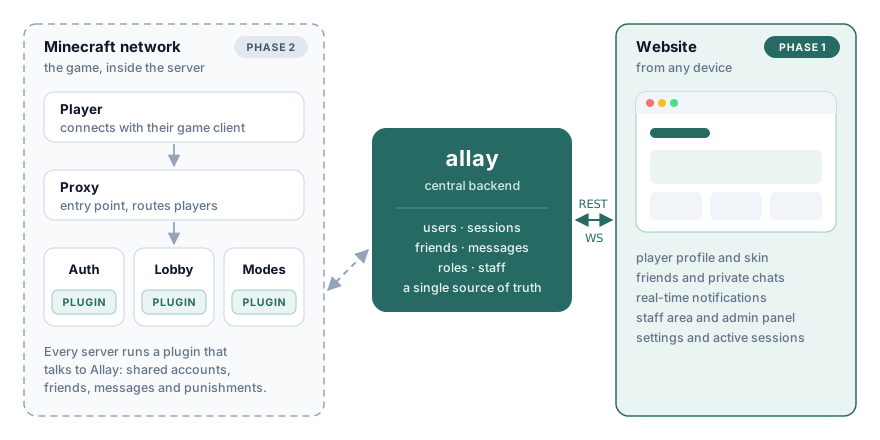
There’s another detail of the game that shapes the design: there are premium accounts (the game purchased, verified by Microsoft) and non-premium ones, which many servers accept. A non-premium player has no verified identity, so the server needs its own password-based account system. Allay includes one from the start.
A project planned in phases
From the initial analysis we saw that the full system was far too big for the time we had: user and role management, friends, messaging, staff, notifications, help requests, reports, punishments, economy, store, mailbox… We defined each module with its requirements (over 60 in total), marking whether they belonged to the web, the game or both.
So we split it into four phases, and the final project focused on the first one:
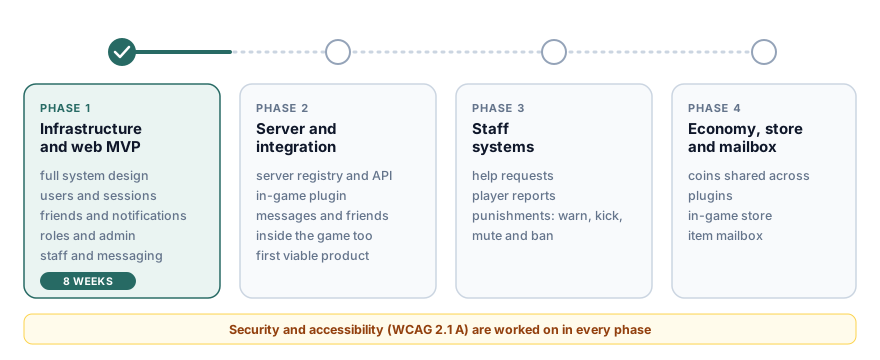
Phase 1 had two blocks over 8 weeks, organised in one-week sprints: the theoretical design of the whole system (requirements, technologies, databases, brand identity) and the first working web version, with users and sessions, friends, real-time notifications, admin and roles, a staff area and private messaging.
Architecture
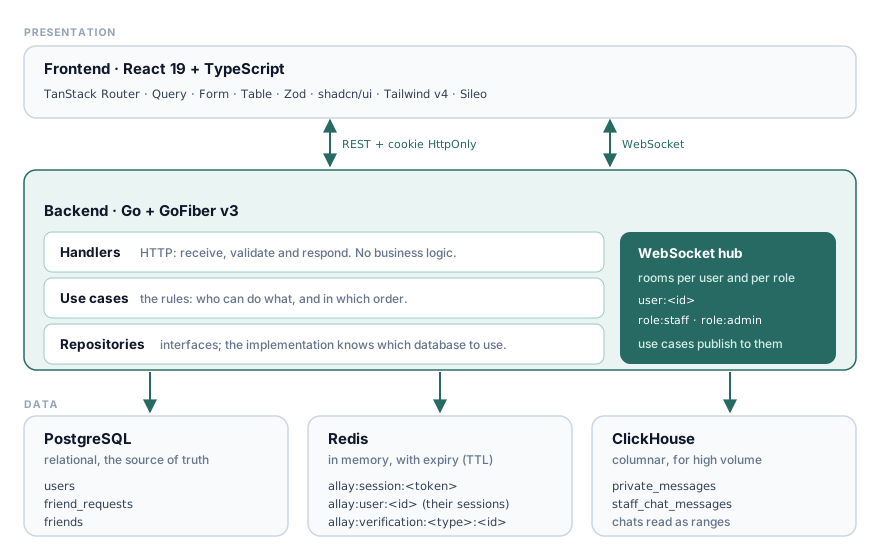
Allay follows a three-tier client-server model, and the backend repeats the same idea internally:
- Frontend in React 19 with TypeScript, TanStack Router (file-based and protected routes), TanStack Query for data caching and the session, TanStack Form and Table, Zod to validate every API response, shadcn/ui and Tailwind v4.
- Backend in Go with GoFiber v3, organised into handlers (HTTP only), use cases (all the business logic) and repositories (data access behind interfaces). Use cases don’t know whether a piece of data comes from PostgreSQL, Redis or ClickHouse.
- Three databases, each one where it fits best.
One database for each job
Using three systems in a final degree project may seem like overkill, but each one has a clear role:
- PostgreSQL is the source of truth: users, friend requests and friendships, with their constraints, foreign keys and
ENUMtypes for roles and statuses. - Redis holds what gets checked on every request and has an expiry: sessions and temporary verifications (tickets, password resets…). Checking a session in memory is much cheaper than hitting disk on every request.
- ClickHouse stores the messages, both private ones and the staff chat. It’s a columnar database built for huge volumes, and on a large network messages grow much faster than any other table.
PostgreSQL and ClickHouse migrations are versioned .sql files that the backend applies by itself on startup with golang-migrate.
Accounts, sessions and security
Premium and non-premium
When signing up, the player chooses whether their account is premium. Under the hood, this is what happens:
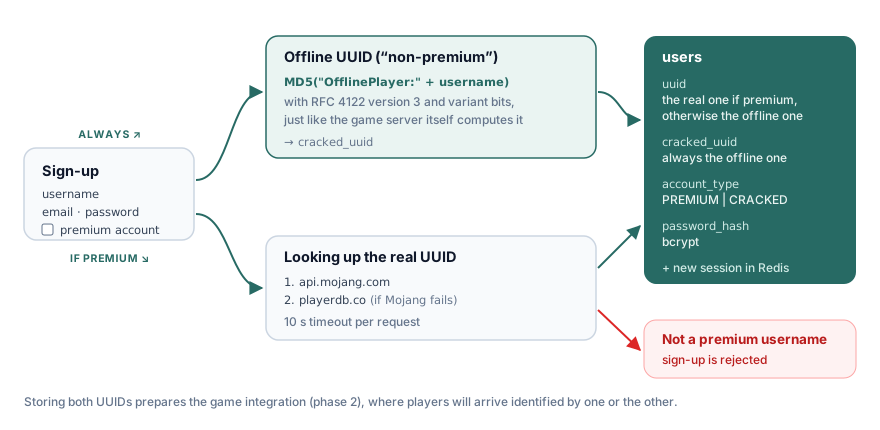
The offline UUID is always computed, exactly the way the Minecraft server itself does it: an MD5 of "OfflinePlayer:" + username with UUID version 3 bits. If the account is premium, the backend queries the Mojang API for the real UUID (with PlayerDB as a fallback if Mojang doesn’t respond) and rejects the sign-up if that username doesn’t belong to a purchased account. Storing both UUIDs lays the groundwork for phase 2, when players arrive from the game.
Sessions
- Passwords are stored with bcrypt.
- On login, a token (a ULID) is generated and sent in an
HttpOnlycookie, inaccessible from JavaScript. Sessions last 7 days. - The session lives in Redis with its TTL, along with the browser and operating system it was opened from. Each user also has a list of their sessions, which is cleaned of expired ones whenever a new one is created.
- From the settings page you can see and close sessions on other devices. The frontend never sees the token of the other sessions: the backend identifies them by a fragment of their SHA-256, so whatever reaches the browser can’t be used to impersonate anyone.
Roles
There are four hierarchical roles: USER, STAFF, ADMIN and OWNER, and each one has the permissions of those below it. Routes are grouped by the level they require and each group goes through its own middleware: one checks the session, another that the user is at least STAFF (staff area) and another that they’re at least ADMIN (admin panel). On the frontend, TanStack Router’s protected routes redirect to the login page before loading if there’s no session.
Real time with WebSockets
Friend requests, private messages and the staff chat arrive in real time. To do that, the backend runs a WebSocket hub with rooms: each connection joins its user’s room (user:<id>) and its role’s room (role:staff, role:admin…). When a use case needs to notify someone, it publishes to the right room and every open tab for that person receives the event. Messages travel in a simple JSON envelope, { type, data }, and the frontend registers handlers per type.
The challenge here is authentication. The browser’s WebSocket API doesn’t let you add custom headers, and putting the session token in the URL is a bad idea, because URLs end up in logs. The solution I used is an ephemeral ticket:
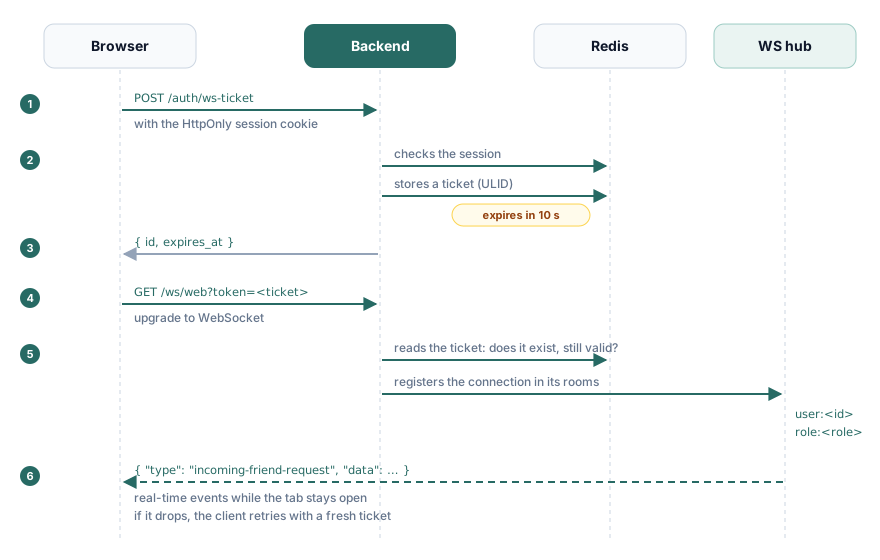
- The browser asks for a ticket with a regular request, authenticated with its cookie.
- The backend generates a random ID, stores it in Redis linked to the user and gives it a 10-second lifetime.
- The browser opens the WebSocket with that ticket in the URL.
- The backend validates it, loads the user and registers the connection in their rooms.
The real session token never leaves the cookie, and whatever shows up in the URL expires before it’s of any use. If the connection drops, the client requests a new ticket and retries with increasing back-off.
Messages in ClickHouse
The part I enjoyed designing the most was the storage for private messages. In ClickHouse, the sorting key (ORDER BY) decides how data is laid out on disk, and this is the one I chose:
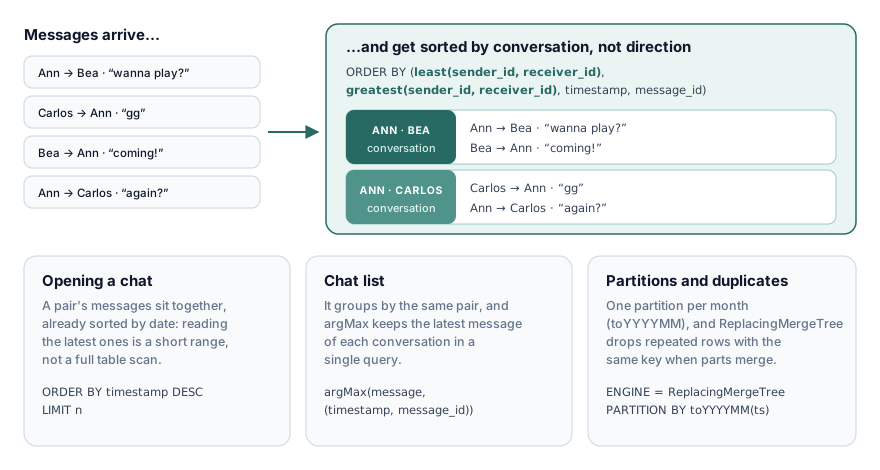
Using least(sender_id, receiver_id) and greatest(sender_id, receiver_id) makes messages from A to B and from B to A share the same key, so a whole conversation sits contiguously, sorted by date. Opening a chat means reading a short range, not scanning the table.
The chat list (the conversation with each friend and its latest message) comes from a single query: it groups by that same pair and argMax keeps the most recent message of each one. On top of that, the table uses ReplacingMergeTree, which drops duplicate rows with the same key when parts are merged, and it’s partitioned by month.
The interface
This is where Helen’s work really shows. Before writing a single line of UI, she designed the full brand identity in Illustrator (the logo, inspired by the game’s own allay mob, and the colour palette) and the wireframes for every screen in Figma. She then brought them to life in React with shadcn/ui and Tailwind. These are some screens from the final version of phase 1:
Note: the screenshots are in Spanish because the project’s website was only built in Spanish; multi-language support wasn’t part of phase 1.
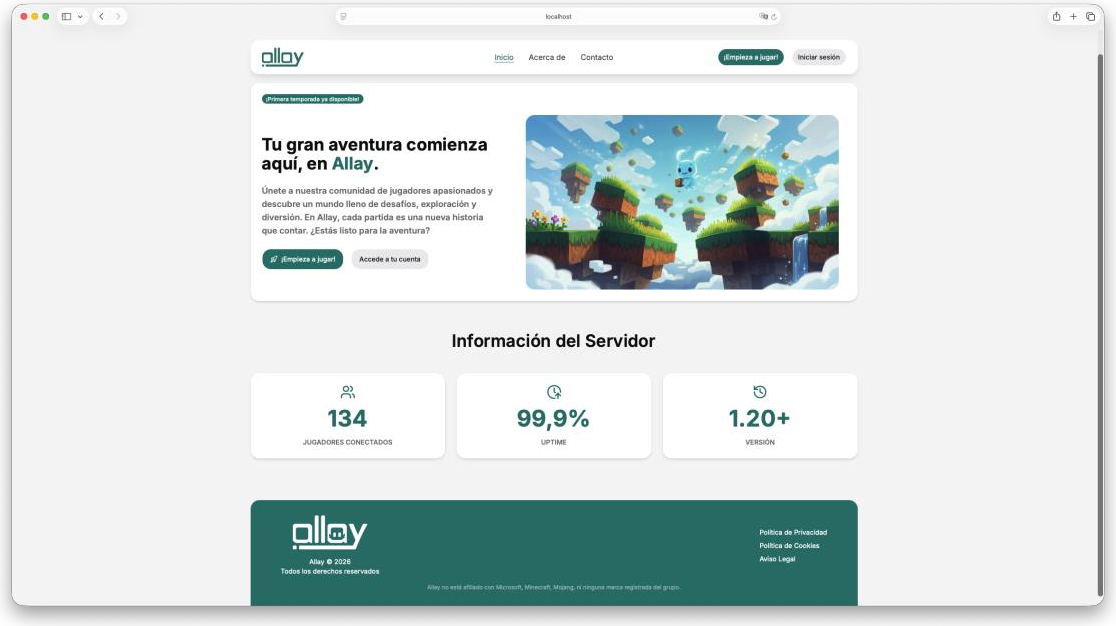
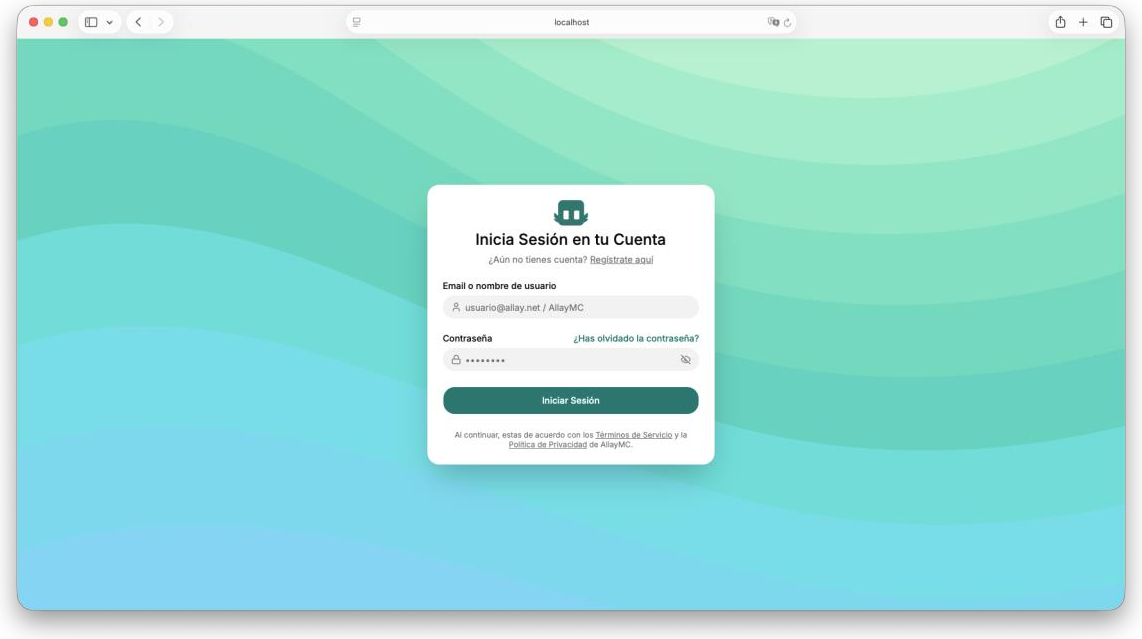
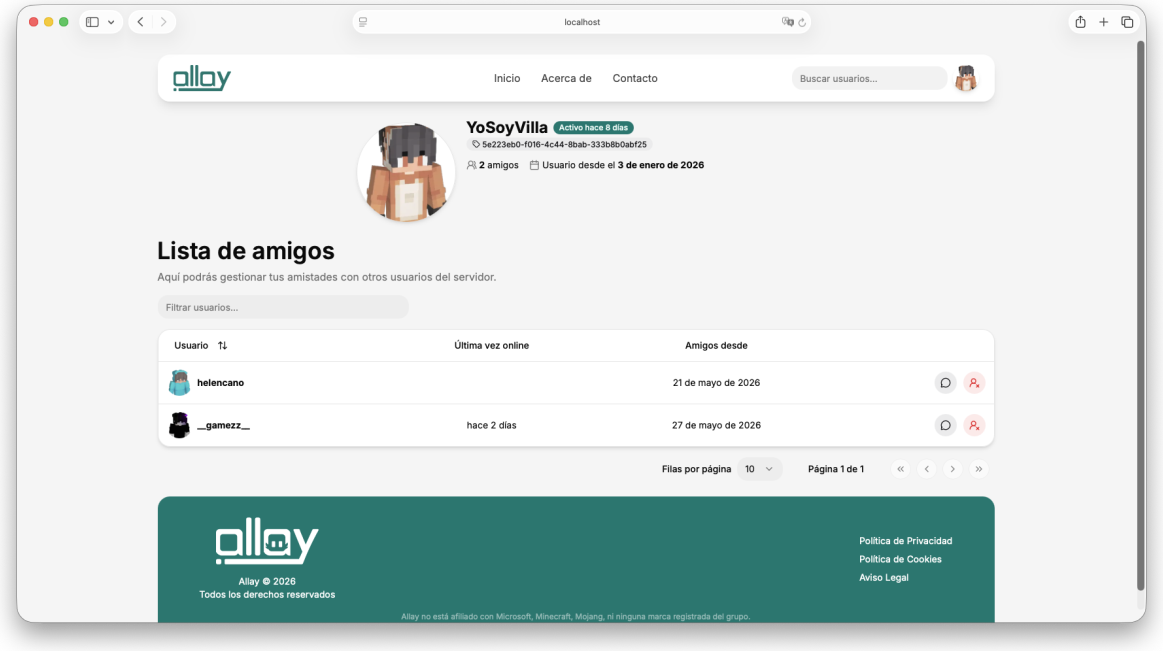
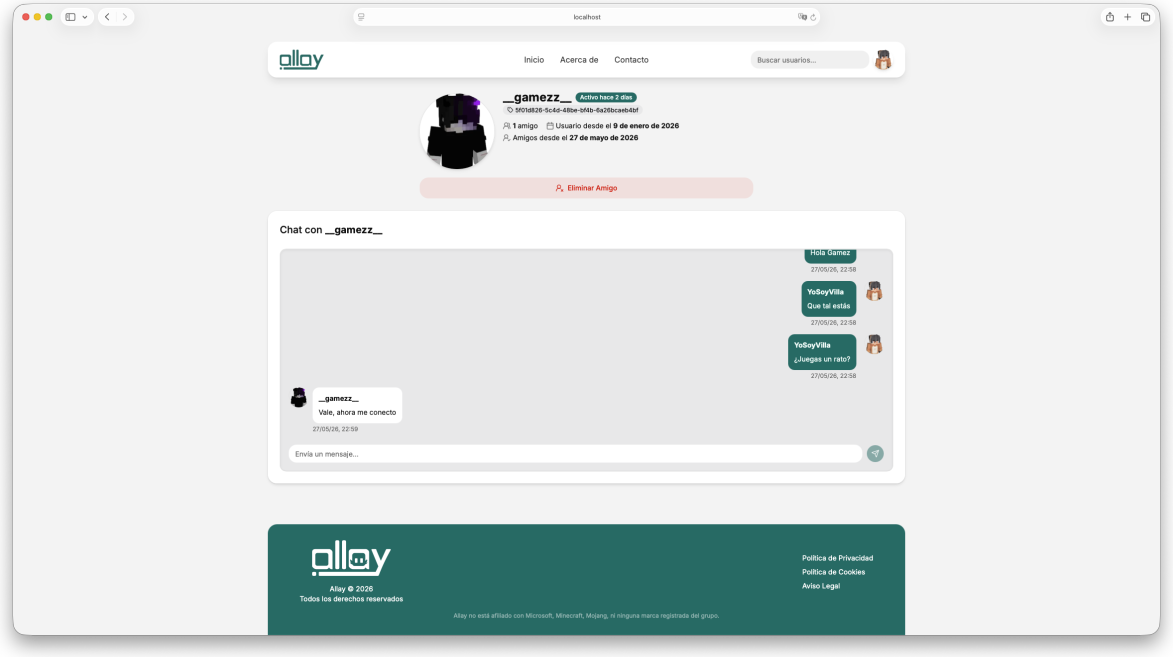
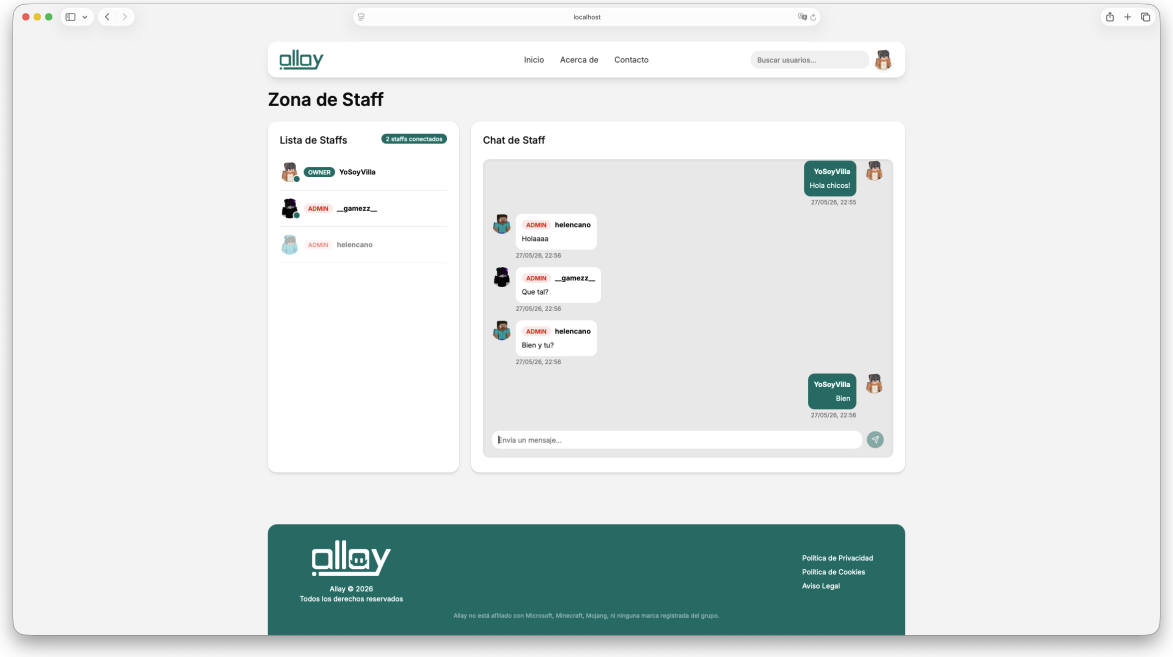
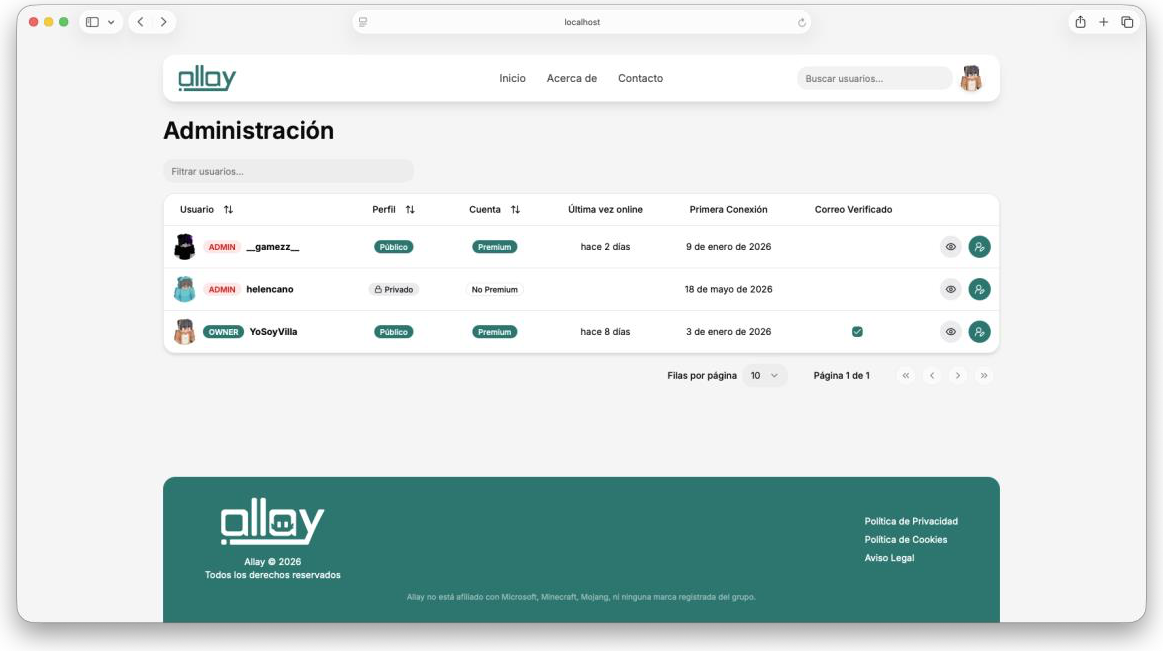
Player skins are fetched from their username through a backend endpoint, and real-time notifications are displayed with Sileo.
Outcome
We completed practically all of phase 1: the full system design, the brand identity and a working website with accounts, sessions, friends, messaging, notifications, staff and administration. It can be run locally with Docker Compose for the databases, make build for the backend and pnpm for the frontend.
The project was never deployed to production, and phases 2, 3 and 4 (game integration, staff systems and the economy) remain as future work.
What I take away
Allay was, by far, the most ambitious project I had taken on outside of plugins. It forced me to think about the whole system first and then make deliberate cuts about what went into each phase, instead of just starting to code.
It also pushed me beyond what the degree covers: Go instead of the languages on the syllabus, a columnar database for messages, WebSockets with custom authentication and a layered architecture built to grow. Above all, it was a team project from start to finish. Having someone trained in graphic design changed the result: Allay doesn’t look like a class project with a default template, it has a polished brand and interface. That let me focus on the architecture knowing that what I built was going to look good.